

Temporal Worker
Run agent sessions as durable Temporal workflows.
The Temporal worker target turns sessions into durable Temporal workflows. Prompts, skills, tasks, shell calls, checkpoints, approvals, and cancellation all route through the SessionRuntime boundary; deterministic workflow code orchestrates state, and nondeterministic work happens in activities.
Use this target for long-running jobs, approval delays, and restart durability. Before rollout, validate namespace authentication, gRPC readiness, worker restart, workflow replay, activity retry, and approval resumption against the Temporal environment you operate.
Build the worker artifact
fh build --target temporal-workerOutput:
.fabricharness/build/temporal-worker/
  dist/worker.mjs
  package.json
  manifest.json
  README.temporal-worker.md
The artifact bundles Harness runtime code and declares @temporalio/client,
@temporalio/worker, and @temporalio/workflow in its generated package.json. Install production
dependencies in the artifact directory before moving it to an isolated host or container; do not
depend on a monorepo's hoisted node_modules layout.
cd .fabricharness/build/temporal-worker
npm install --omit=dev
node dist/worker.mjs
Run the worker
You can run the prebuilt artifact:
node .fabricharness/build/temporal-worker/dist/worker.mjsOr run a worker against the live workspace (great for development):
fh temporal-worker --task-queue fabric-harness --address localhost:7233Drive an agent on the worker
fh run ask --target temporal-worker --id ask-001 --prompt "What is Temporal?"The CLI:
- Connects to Temporal,
- Starts (or resumes) the session workflow with id
ask-001, - Signals it with the prompt,
- Streams output back.
Workflow model
Text alternative and Mermaid source
Diagram flow: graph LR; Session workflow leads to Prompt/skill/task request; A leads to Model activity; A leads to Tool activity; A leads to Shell activity; A leads to Checkpoint activity; A leads to Approval needed?; W leads yes Wait for approval signal; SIG leads to T; W leads no Append result.
graph LR
    A[Session workflow] --> P[Prompt/skill/task request]
    A --> M[Model activity]
    A --> T[Tool activity]
    A --> S[Shell activity]
    A --> C[Checkpoint activity]
    A --> W{Approval needed?}
    W -->|yes| SIG[Wait for approval signal]
    SIG --> T
    W -->|no| R[Append result]
What operators verify
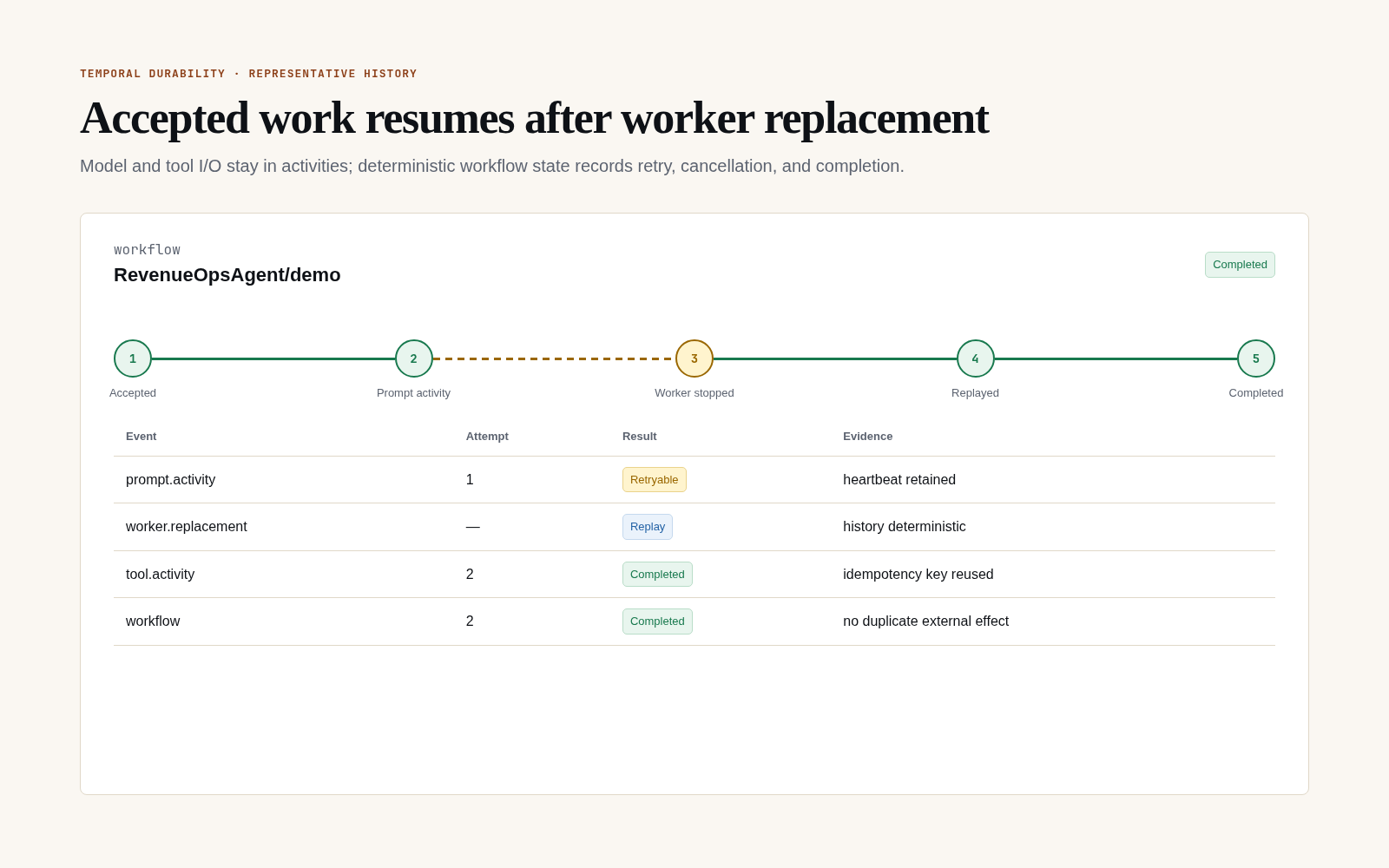
Temporal Web or the equivalent history API should show the accepted request, activity attempt, worker interruption, replay, and terminal result. The representative history below makes the no-duplicate-effect expectation explicit.
Supported runtime operations
| Capability | Temporal path |
|---|---|
session.prompt() | Durable workflow request + model/tool activities |
session.skill() | Same prompt runtime with skill-loaded instructions |
session.task() | Durable task request; child-workflow shape where configured |
session.shell() | Shell activity through the selected sandbox |
| Checkpoint create/restore | Activity-backed when the sandbox reports support |
| Approvals | Workflow waits on approval signals; no worker thread is held |
| Cancellation | Workflow/activity cancellation is propagated where provider APIs support it |
| Worker restart | Workflow state survives; activities are idempotency-keyed |
| Attachments | Stored through the configured durable attachment/session store and remain addressable across worker rotation |
| Tenant/cost/audit events | Model-attempt entries include usage and cost; tenant and operation records remain store-backed |
Unsupported inline-only features should fail with explicit runtime errors rather than silently degrading.
Cancel from the same AbortSignal used by the lightweight runtime. Fabric removes the signal and
callbacks before serializing workflow input, then cancels the owning workflow when the signal fires:
const controller = new AbortController();
const pending = session.prompt('Build the report', { signal: controller.signal });

controller.abort(new DOMException('Operator cancelled', 'AbortError'));
await pending; // rejects with AbortError
Configuration
.fabricharness/config.ts:
export default {
  temporal: {
    address: 'localhost:7233',
    taskQueue: 'fabric-harness',
    namespace: 'default',
    workflowIdPrefix: 'fabric',
    promptWorkflowMode: 'hybrid',
    apiKeyEnv: 'TEMPORAL_API_KEY',     // for Temporal Cloud
    tls: { /* ... */ },
  },
};
Environment overrides:
| Variable | Purpose |
|---|---|
FABRIC_TEMPORAL_ADDRESS | host:port |
FABRIC_TEMPORAL_TASK_QUEUE | task queue name |
FABRIC_TEMPORAL_NAMESPACE | namespace |
FABRIC_TEMPORAL_CONNECT_ATTEMPTS | Optional bounded retry attempts for client/worker connection startup. |
FABRIC_TEMPORAL_CONNECT_INITIAL_DELAY_MS | Optional first retry delay in milliseconds. |
FABRIC_TEMPORAL_CONNECT_MAX_DELAY_MS | Optional max retry delay in milliseconds. |
Temporal Cloud
Set address to your Temporal Cloud endpoint, configure mTLS or API key, and the worker connects normally:
export default {
  temporal: {
    address: 'my-namespace.tmprl.cloud:7233',
    namespace: 'my-namespace',
    apiKeyEnv: 'TEMPORAL_API_KEY',
    tls: { serverName: 'my-namespace.tmprl.cloud' },
  },
};
Operational notes
- Workers are stateless. Run several behind your task queue for throughput.
- Approval waits are signal-driven and consume no worker time.
- Use Temporal's UI or
temporal workflow showto inspect history independently offh inspect. - Keep default unit/mock Temporal tests in main CI and run the live conformance suite on the scheduled workflow. It covers prompt, skill, child task, shell, checkpoint, tool and custom approvals, cancellation, activity retry, attachments, usage/cost, and worker restart. For local
temporalio/auto-setupwith Postgres, setDB_PORT=5432and wait for a real gRPC connection rather than only checking the TCP port. - For production, test worker restart while a workflow is waiting for approval, retry behavior for failed activities, namespace/auth configuration, and cancellation of long shell/model work.