

Runtime modes
inline (default), stateless (headless), and temporal (durable). When to use each.
init({ runtime }) accepts three values. Runtime is independent from the SDK import entrypoint: agents from both @fabric-harness/sdk and @fabric-harness/sdk use the shared session primitives, while runtime controls persistence and durability.
| Mode | Default? | Persistence | Use when |
|---|---|---|---|
inline | yes | In-memory by default; pluggable SessionStore (SQLite/Postgres/file) for durability | You want conversation continuity, artifact persistence, approval gating, and CLI tooling like fh sessions/fh inspect. |
stateless | no — explicit opt-in | None. Each invocation is independent. | High-volume webhooks, edge runtimes, or prototypes where state would just be discarded. |
temporal | no — explicit opt-in | Durable workflow state via Temporal. | Long-running, restartable, multi-day agents that must survive crashes or human approval delays. Requires @fabric-harness/temporal. |
inline (default)
import { init } from '@fabric-harness/sdk';

const agent = await init({
  model: 'openai/gpt-5.5',
  // runtime: 'inline' — implicit
});
In-memory InMemorySessionStore is used unless you pass store. History, artifacts, and approval state live for the lifetime of the process. Pass a real store when you need persistence:
import { FileSessionStore } from '@fabric-harness/node';

const agent = await init({
  model: 'openai/gpt-5.5',
  store: new FileSessionStore({ rootDir: '.fabricharness/sessions' }),
});
Production safety
In production (FABRIC_ENV=production or NODE_ENV=production), inline without an explicit SessionStore emits a warning. The runtime still runs — you just lose state on restart. To silence the warning, either:
- Configure a
SessionStore(recommended). - Set
FABRIC_ALLOW_EPHEMERAL_STATE=1to acknowledge in-memory state explicitly. - Use
runtime: 'stateless'to opt into ephemeral semantics on purpose.
stateless (headless)
import { init } from '@fabric-harness/sdk';

const agent = await init({
  model: 'openai/gpt-5.5',
  runtime: 'stateless',
});
The session uses NoopSessionStore — every write is discarded, every read returns the empty initial state. Use this for:
- Webhook handlers where the response is the only output.
- Cloudflare Workers / Vercel Edge where there's no durable storage attached.
- Prototypes where you don't yet care about conversation continuity.
What stateless disables
- Session entry / event persistence.
- Artifact persistence (
session.artifact(...)falls back to a fingerprint-onlyArtifactRefwith no stored bytes). - Approval waiting via the store. Approvals only work in stateless mode if you pass an
onApprovalcallback that returns a synchronous decision. fh sessions,fh inspect,fh logswill not show stateless runs.
If any of those matter, stay on inline and configure a store.
temporal (durable)
There are two ways to put an agent on the Temporal runtime — the direct API (recommended) and the CLI-managed flow.
What recovery looks like
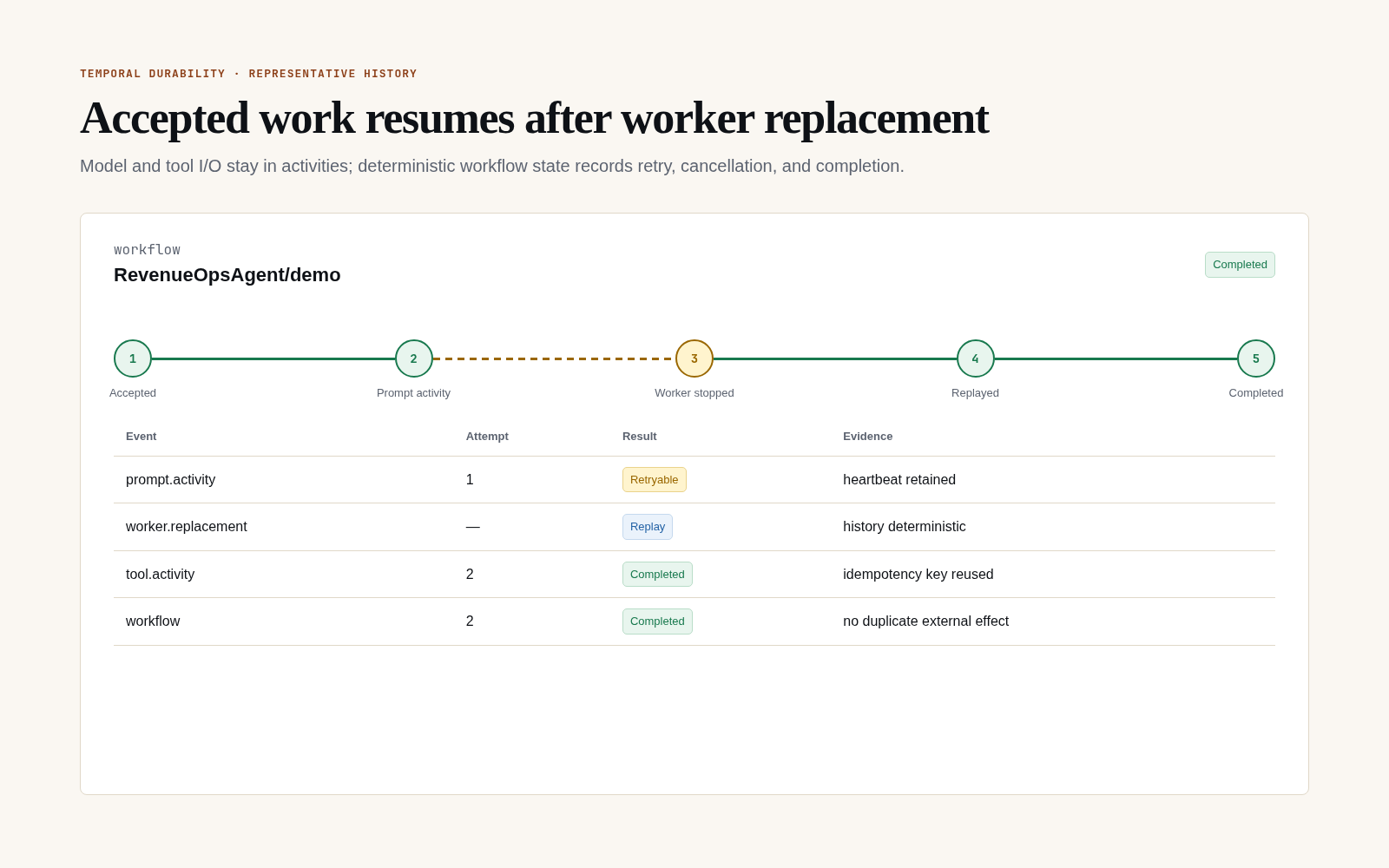
Durability is demonstrated by an interrupted run, deterministic replay, stable idempotency, and a terminal result without repeating the external effect. A normal uninterrupted success does not establish that contract.
Direct API
Wire temporalSessionRuntime into init() so each prompt/task/shell/checkpoint.* routes through Temporal workflows:
import { init } from '@fabric-harness/sdk';
import { temporalSessionRuntime } from '@fabric-harness/temporal';

const fabric = await init({
  runtime: 'temporal',
  sessionRuntime: temporalSessionRuntime({
    address: 'localhost:7233',
    namespace: 'default',
    taskQueue: 'fabric-harness',
  }),
});
const session = await fabric.session();
await session.prompt('Triage issue #42');
The Temporal client connection is opened lazily on the first session and shared across all sessions produced by the factory. For tests, pass mode: 'mock' to use the in-process mock runtime.
CLI-managed
When running under fabric-harness run <agent> --temporal, the CLI constructs the Temporal session for you and you only declare the runtime mode:
import { init } from '@fabric-harness/sdk/strict';

const fabric = await init({ runtime: 'temporal' });
Sessions execute as Temporal workflows. The agent code is unchanged — the runtime adapter handles checkpointing, retries, and resume. See Temporal worker deployment for setup.
Temporal mode requires @fabric-harness/temporal, a Temporal cluster (or the bundled mock for tests), and a worker process running fh temporal-worker.
Switching modes
Modes are runtime-only. They are separate from the minimal vs complete import entrypoints and separate from deploy targets. Nothing in your agent code changes when you swap:
const dev      = await init({ runtime: 'stateless' });             // dev / preview
const prod     = await init({ runtime: 'inline', store: pgStore }); // prod web
const longJob  = await init({ runtime: 'temporal' });              // batch / nightly
Configure runtime at deploy time via FABRIC_RUNTIME env or your .fabricharness/config.ts. The agent file stays the same.
See also
- SDK entrypoints, runtimes, and targets — the full conceptual split.
- Headless agents with the minimal entrypoint — the progressive-disclosure walkthrough.
- Session stores — pluggable persistence options.
- Temporal worker deployment — setting up the worker.