

Databricks quickstart
Install, scaffold, mock, connect, test, build, and deploy a governed Databricks agent with Fabric Harness.
This walkthrough starts with no credentials, proves the local agent contract, then connects the same
project to Databricks with OAuth. Use the workspace origin everywhere, for example
https://adb-1234567890123456.7.azuredatabricks.net. Do not use an AI Gateway path as the host.
For an end-to-end customer architecture—OBO identity, Genie, SELECT-only verification,
exact-operation approval for one allowlisted Job, Lakebase recovery, MLflow correlation, and an
optional Temporal worker—use the runnable
with-databricks-revenue-ops reference after this quickstart.
Text alternative and Mermaid source
Diagram flow: Install project CLI leads to Scaffold Databricks agent; Scaffold leads to Run with deterministic mock; Mock leads to Databricks CLI OAuth login; Login leads to Live Genie + governed SQL + cost run; Live leads to Add RAG, Lakeflow, or Lakebase recipes; Extend leads to Build portable Databricks App.
flowchart LR
  Install[Install project CLI] --> Scaffold[Scaffold Databricks agent]
  Scaffold --> Mock[Run with deterministic mock]
  Mock --> Login[Databricks CLI OAuth login]
  Login --> Live[Live Genie + governed SQL + cost run]
  Live --> Extend[Add RAG, Lakeflow, or Lakebase recipes]
  Extend --> Build[Build portable Databricks App]

  classDef local fill:#e8f1ff,stroke:#4f7fd9,color:#172033
  classDef workspace fill:#e5f7ec,stroke:#2f9e62,color:#172033
  class Install,Scaffold,Mock local
  class Login,Live,Extend,Build workspace
1. Check the prerequisites
The core Fabric Harness packages support Node.js 20.18 or later, but
@fabric-harness/databricks requires Node.js 22 or later. Use Node 22 LTS for this walkthrough.
The Databricks CLI is optional for mock mode and required for the recommended local OAuth and
deployment flow.
node --version
npm --version
databricks version
If databricks is missing, install the current CLI using the
official Databricks instructions:
curl -fsSL https://raw.githubusercontent.com/databricks/setup-cli/main/install.sh | sh
databricks version
2. Create the agent project
Run the published CLI directly. The generated project pins compatible Harness packages together, so a global CLI is not required.
npx --yes @fabric-harness/cli@latest init \
  --template databricks \
  --dir analytics-agent
cd analytics-agent
npm install
The template creates:
.fabricharness/
  jobs/databricks-analyst.ts
  policies/databricks.ts
  roles/data-analyst.md
  skills/analyze-table/SKILL.md
  fixtures/analytics.json
  config.ts
  databricks-certification.json
test/databricks-safe-tools.test.ts
NEXT_STEPS.md
databricks.yml
app.yaml
.env.example
Use the project-local executable for every following command:
npx fh --version
npx fh doctor --getting-started --tools --model mock/test-model
npm test
npx fh agents
npx fh describe databricks-analyst
3. Run without credentials
npx fh run databricks-analyst \
  --question "What tables are in main?" \
  --mock
--mock replaces the model with a deterministic in-process provider. It needs no Databricks or AI
credentials and verifies that Harness can discover and load the TypeScript definition, local policy,
role, skill, schema, model loop, and result contract.
npm test separately proves that the generated SQL tool admits a SELECT and rejects a mutation
before the mock Statement Execution client is called. Neither check requires credentials.
The answer is synthetic. Mock mode does not list real tables, execute SQL, check Unity Catalog
grants, call AI Gateway, or validate OAuth. A response such as Mock response: What tables are in main? proves the application path, not the factual quality of a data answer.
4. Create another simple agent
Generate a finite job in the same project:
npx fh new job helloReplace .fabricharness/jobs/hello.ts with:
import { defineAgent, schema } from '@fabric-harness/sdk';

export default defineAgent({
  name: 'hello',
  description: 'Give a short personalized greeting.',
  input: schema.object({ name: schema.string() }),
  output: schema.string(),
  triggers: { manual: true, webhook: true },
  async run({ input, prompt }) {
    return await prompt(`Greet ${input.name} in one sentence.`);
  },
});
Discover and run it without provider credentials:
npx fh agents
npx fh describe hello
npx fh run hello --name Ada --mock
To test the deployment protocol locally, start the HTTP server in one terminal:
npx fh dev --mock --port 4000Invoke the job from another terminal:
curl --fail --request POST http://127.0.0.1:4000/jobs/hello \
  --header 'content-type: application/json' \
  --data '{"name":"Ada"}'
5. Authenticate to Databricks
For a developer workstation, use a named Databricks CLI OAuth profile. The browser login stores and refreshes the user OAuth credential through the Databricks CLI; Fabric Harness asks the CLI for a short-lived access token when it needs one.
export DATABRICKS_HOST=https://adb-1234567890123456.7.azuredatabricks.net

databricks auth login \
  --host "$DATABRICKS_HOST" \
  --profile fabric-harness

databricks auth profiles
databricks current-user me --profile fabric-harness
npx fh doctor --target databricks-app
Create .env.local:
DATABRICKS_HOST=https://adb-1234567890123456.7.azuredatabricks.net
DATABRICKS_CONFIG_PROFILE=fabric-harness
DATABRICKS_AUTH_MODE=cli
DATABRICKS_MODEL=system.ai.gpt-oss-20b
DATABRICKS_WAREHOUSE_ID=0123456789abcdef
DATABRICKS_GENIE_SPACE_ID=0123456789abcdef0123456789abcdef
DATABRICKS_CATALOG=main
DATABRICKS_ANALYTICS_STEWARD_AUDIENCE=analytics-stewards
DATABRICKS_COST_TENANT_ID=acme
DATABRICKS_COST_PER_DAY_USD=50
DATABRICKS_INFERENCE_MODE=auto
The workspace OAuth credential authenticates both management/data APIs and the selected Databricks
model surface. You do not configure a separate OpenAI key. The principal still needs permission to
use the model or serving endpoint, CAN USE/CAN QUERY for the SQL Warehouse as appropriate, and
the required Unity Catalog grants.
For unattended CI or production-like local tests, replace CLI auth with OAuth M2M:
DATABRICKS_HOST=https://adb-1234567890123456.7.azuredatabricks.net
DATABRICKS_CLIENT_ID=00000000-0000-0000-0000-000000000000
DATABRICKS_CLIENT_SECRET=resolve-from-a-secret-store
DATABRICKS_MODEL=system.ai.gpt-oss-20b
DATABRICKS_WAREHOUSE_ID=0123456789abcdef
DATABRICKS_GENIE_SPACE_ID=0123456789abcdef0123456789abcdef
DATABRICKS_CATALOG=main
DATABRICKS_ANALYTICS_STEWARD_AUDIENCE=analytics-stewards
DATABRICKS_COST_TENANT_ID=acme
DATABRICKS_COST_PER_DAY_USD=50
Do not set CLI-profile, PAT, and M2M credentials together when testing authentication behavior. See Local naming and authentication for PAT, M2M, Databricks App service principal, and OBO patterns.
6. Run the analyst against the workspace
First run the target-aware preflight, then remove --mock:
npx fh doctor --target databricks-app

npx fh run databricks-analyst \
  --question "List the tables in main.default"

npx fh run databricks-analyst \
  --question "Describe main.default.my_table and suggest three quality checks"
The generated analyst is the governed analytics-copilot spine. Ordinary Genie questions and one
statement SELECT through sql_read stay interactive; arbitrary SQL remains available only behind
the analytics-steward approval route. Unity Catalog discovery and System Tables consumption are
included, and an actual-cost-backed daily tenant limit blocks the next model ask after the configured
budget is exhausted. Test an allowed query, inspect the SQL, verify a denied Unity Catalog object,
and exercise the approval path.
Live startup fails before the first model ask when the Warehouse, Genie Agent, steward audience, tenant id, or positive daily budget is missing. Mock mode deliberately bypasses those workspace bindings while retaining definition and policy assembly.
Inspect the resulting session and audit trail:
npx fh sessions
npx fh inspect <session-id>
npx fh logs <session-id>
npx fh approvals <session-id>
After deployment, discover and resolve approvals through the App without granting the caller operator-console access:
TOKEN="$(databricks auth token --host "$DATABRICKS_HOST" | jq -r .access_token)"
export DATABRICKS_OAUTH_TOKEN="$TOKEN"
npx fh approvals \
  --url "$DATABRICKS_APP_URL/api" \
  --token-env DATABRICKS_OAUTH_TOKEN
The remote list is tenant-scoped. Use the returned session and approval ids with fh approve or
fh reject and the same URL and token environment variable.
7. Add and test Databricks features
Preview recipes before changing the workspace, then install only the surfaces the agent needs:
npx fh add databricks sql --dry-run
npx fh add databricks sql
npx fh add databricks ai-search
npx fh add databricks rag-chain
npx fh add databricks lakeflow
npx fh add databricks jobs
npx fh add databricks lakebase
npx fh add databricks system-tables-cost
npx fh add databricks apps
npx fh add databricks agent-services
npm install
npm run build| Capability | Credential-free check | Live proof |
|---|---|---|
| AI Gateway/model | fh run ... --mock | A run without --mock returns a model response. |
| SQL + Unity Catalog | Definition and policy load | Allowed metadata/query succeeds; denied catalog access remains denied. |
| AI Search/RAG | Recipe build and deterministic mock tests | Known document is retrieved with citations; insufficient context is declined. |
| Lakeflow + Jobs | Recipe build and request-contract tests | Create/read/cancel against a test job or pipeline. |
| Lakebase | Persistence bundle build | Session survives App process replacement and credential refresh. |
| Cost + lineage | Event schema tests | Tenant/principal tags appear in MLflow/system-table evidence. |
| Human approval | Local approval contract | Pause, App redeploy, approve, and resume without losing state. |
| OBO | Identity contract tests | Signed-in user permissions differ from the App service principal as expected. |
| Agent Services | Lifecycle request contracts | Temporary registration is created, discovered, updated, permissioned, and deleted in Unity Catalog. |
Use Databricks recipes for required environment variables and RAG on Databricks for the MLflow evaluation and adversarial/insufficient-context workflow. Mocked unit tests and live certification answer different questions; keep both in release CI.
8. Build and deploy a Databricks App
Build and inspect the deployment plan first:
npx fh build --target databricks-app
npx fh deploy \
  --target databricks-app \
  --profile fabric-harness \
  --preview
Then deploy with the same profile:
npx fh deploy \
  --target databricks-app \
  --profile fabric-harness
The build output is under .fabricharness/build/databricks-app/. Fabric Harness produces the App
server, manifest, app.yaml, and Databricks Declarative Automation Bundle configuration. Databricks App resources and
secret references should supply production configuration; do not commit tokens or client secrets.
The output is a portable package: workspace-owned contracts are bundled and the directory can be
handed to Runway or another deployer without the source repository. See
Portable agent packages.
What developers see in the App
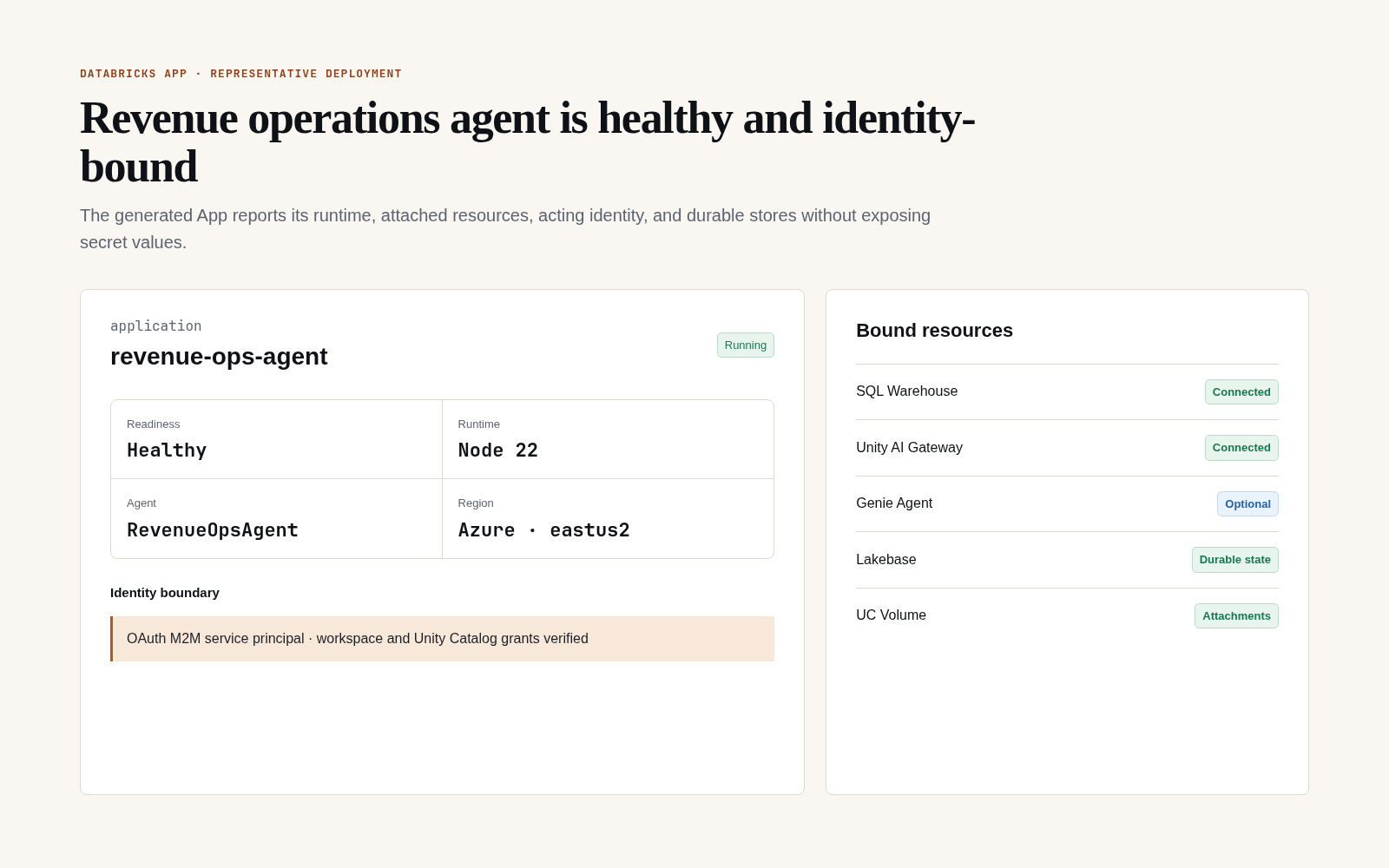
The deployed App should make the selected agent, runtime health, acting identity, region, and bound Databricks resources inspectable without rendering secret values. This is a representative, sanitized deployment state; names and resource health come from the active environment.
Continue with the Databricks App tutorial for App resources, Lakebase durability, OBO, approvals, restart/redeploy recovery, and protected live certification.