

Databricks App Tutorial
Scaffold, test, build, deploy, and persist a Fabric Harness agent on Databricks Apps.
This tutorial deploys a finite analytics job into Databricks Apps. The App service principal calls Model Serving and Unity Catalog APIs, while optional Lakebase stores sessions, durable submissions, and conversation streams.
Read the Databricks architecture first when evaluating identity, governance, or service boundaries. Use this page for the scaffold-to-deployment procedure.
Prerequisites
- Node.js 22+ and pnpm or npm.
- A Databricks workspace with Apps enabled.
- A Model Serving endpoint.
- A SQL warehouse for the generated analytics tools.
- Optional: a Lakebase Autoscaling endpoint and OAuth Postgres role.
1. Scaffold the project
npx @fabric-harness/cli init --template databricks --dir analytics-agent
cd analytics-agent
npm install
The template creates:
.fabricharness/
  jobs/databricks-analyst.ts
  roles/data-analyst.md
  skills/analyze-table/SKILL.md
  config.ts
.env.example
AGENTS.md
package.json
The generated job uses defineDatabricksAgent():
import { defineDatabricksAgent } from '@fabric-harness/databricks';
import { schema } from '@fabric-harness/sdk';

export default defineDatabricksAgent({
  name: 'databricks-analyst',
  description: 'Answer governed analytics questions with Genie and inspectable SQL.',
  input: schema.object({ question: schema.string() }),
  output: schema.string(),
  triggers: { webhook: true, manual: true },
  model: 'system.ai.gpt-oss-20b',
  analyticsCopilot: true,
  tools: ['sql-read', 'genie', 'consumption', 'tables', 'table-info'],
  sandbox: 'empty',
});
2. Run without credentials
The mock path validates discovery, schemas, tool assembly, and the model loop without contacting a workspace:
fh agents
fh describe databricks-analyst
fh run databricks-analyst \
  --question "What tables are available in main?" \
  --mock
Mock mode does not validate OAuth scopes, Unity Catalog grants, SQL execution, or deployment.
3. Configure a live workspace
Copy the template and fill the required values:
cp .env.example .env.localDATABRICKS_HOST=https://<workspace-host>
DATABRICKS_CLIENT_ID=00000000-0000-0000-0000-000000000000
DATABRICKS_CLIENT_SECRET=replace-with-secret-reference
DATABRICKS_WAREHOUSE_ID=0123456789abcdef
DATABRICKS_MODEL=system.ai.gpt-oss-20b
DATABRICKS_GENIE_SPACE_ID=0123456789abcdef0123456789abcdef
DATABRICKS_CATALOG=main
DATABRICKS_ANALYTICS_STEWARD_AUDIENCE=analytics-stewards
DATABRICKS_COST_TENANT_ID=acme
DATABRICKS_COST_PER_DAY_USD=50
DATABRICKS_APP_OBO_REQUIRED=1
FABRIC_DATABRICKS_APP_CAPABILITIES=genie,obo,system-tables-costRun a live source invocation:
fh run databricks-analyst --question "Describe main.sales.orders"The service principal must have workspace access, permission to invoke the serving endpoint,
warehouse usage, CAN RUN on the Genie Agent, System Tables access, and the required Unity Catalog
grants. Missing App capability bindings fail fh doctor --target databricks-app; missing runtime
Warehouse, Genie, steward, tenant, or cost settings fail before the first model ask.
4. Build the App
fh build --target databricks-appExpected summary:
Build complete
  Output    .fabricharness/build/databricks-app
  Manifest  .fabricharness/build/databricks-app/manifest.json
  Jobs      databricks-analyst
  Agents    none
Inspect the v2 manifest before deployment:
jq '{schemaVersion, jobs, agents, entrypoint}' \
  .fabricharness/build/databricks-app/manifest.json
{
"schemaVersion": 2,
"jobs": [{ "name": "databricks-analyst", "kind": "job" }],
"agents": [],
"entrypoint": "dist/server.mjs"
}The artifact includes app.yaml, databricks.yml, the shared v2 Node server, and bundled .mjs
definitions. It does not regenerate a separate legacy HTTP runtime.
For a monorepo application, run the build from the package that owns .fabricharness/. Imports from
workspace-owned agent contracts are bundled into each generated definition, and source-only pnpm
protocols are removed from the runtime package.json. Treat the whole output directory as the
deployment unit:
test -z "$(grep -R -E '\"(workspace|catalog):' .fabricharness/build/databricks-app/package.json || true)"
cp -R .fabricharness/build/databricks-app /tmp/detached-agent-app
The detached directory is the handoff boundary for Runway or another deployment system. It does not need the source repository, its shared-contract package, or Fabric Harness packages at runtime. See Portable agent packages for the full artifact contract, digest-based handoff, isolation test, and deployment-time binding requirements.
What developers see in the App
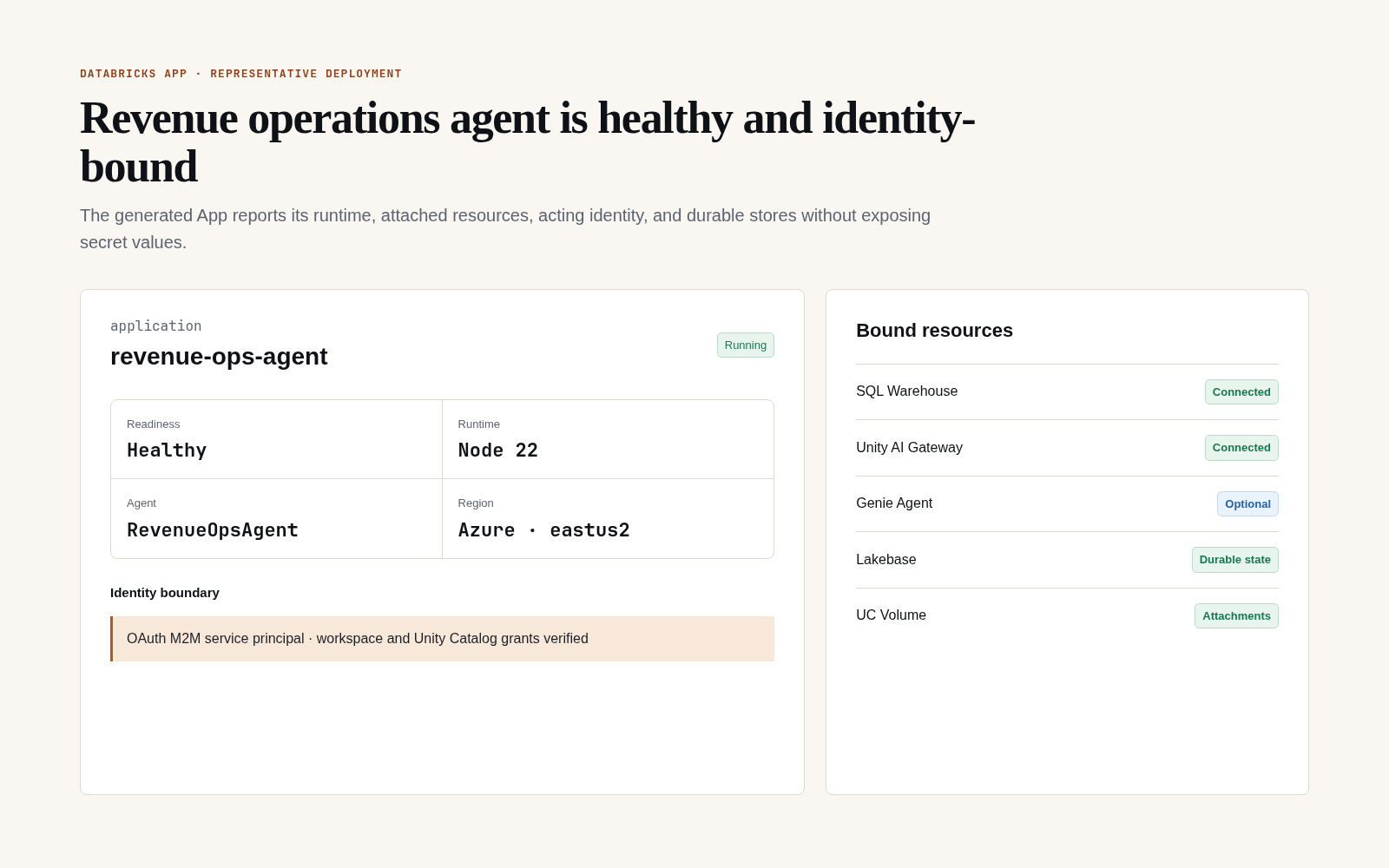
After deployment, inspect the agent identity, readiness, runtime, workspace region, and each bound resource. The representative state below is sanitized and contains no client workspace identifier, principal identifier, token, or secret value.
5. Deploy with a Declarative Automation Bundle
cd .fabricharness/build/databricks-app
databricks auth login --host "$DATABRICKS_HOST"
databricks bundle validate
databricks bundle deploy
databricks bundle run <app-resource-key>
Set provider and resource configuration through Databricks App environment/resources rather than
committing secrets. Apps supplies DATABRICKS_APP_PORT; the generated app.yaml starts
dist/server.mjs on that port.
The generated bundle also creates an MLflow experiment, attaches it to the App with CAN_EDIT, and
injects its ID as DATABRICKS_MLFLOW_EXPERIMENT_ID. This activates submission-correlated MLflow
traces without granting the App access to unrelated experiments. For a direct databricks apps deploy outside the bundle, attach an experiment resource named fabric-mlflow-experiment or set an
experiment ID and grant the App service principal CAN_EDIT yourself.
Bind an existing Genie Agent as a least-privilege App resource in .fabricharness/config.ts:
export default {
  target: 'databricks-app',
  databricks: {
    app: {
      genie: { agentId: '0123456789abcdef0123456789abcdef' },
    },
  },
};
The generated genie_space resource defaults to CAN_RUN and is injected as
DATABRICKS_GENIE_AGENT_ID through valueFrom. CAN_EDIT or CAN_MANAGE requires an explicit
authoring: true on that resource declaration. The App service principal still needs access to the
Agent's warehouse and Unity Catalog data.
Bind any native Databricks App resource
Use databricks.app.resources when the App needs native resources beyond the Genie and AI Search
shortcuts. Harness keeps the Databricks Bundle resource shape intact and adds only:
name, the 1-30 character lowercase App resource key used byvalueFrom;env, the environment variable exposed to the App; andauthoring: true, an explicit acknowledgement required for write, manage, or owner permissions.
import type { FabricHarnessConfig } from '@fabric-harness/node';

export default {
  databricks: {
    app: {
      resources: [
        {
          name: 'analytics-warehouse',
          env: 'DATABRICKS_WAREHOUSE_ID',
          sql_warehouse: {
            id: '0123456789abcdef',
            permission: 'CAN_USE',
          },
        },
        {
          name: 'refresh-job',
          env: 'REFRESH_JOB_ID',
          job: { id: '12345', permission: 'CAN_MANAGE_RUN' },
        },
        {
          name: 'documents-index',
          env: 'DOCUMENTS_INDEX',
          uc_securable: {
            securable_type: 'TABLE',
            securable_full_name: 'main.rag.documents_index',
            permission: 'SELECT',
          },
        },
        {
          name: 'vendor-token',
          env: 'VENDOR_API_TOKEN',
          secret: {
            scope: 'analytics-agent',
            key: 'vendor_api_token',
            permission: 'READ',
          },
        },
      ],
    },
  },
} satisfies FabricHarnessConfig;
The supported blocks and normal runtime permissions are:
| Native block | Databricks resource | Normal runtime permissions |
|---|---|---|
app | Another Databricks App | CAN_USE |
database | Lakebase provisioned database | CAN_CONNECT_AND_CREATE |
postgres | Lakebase Autoscaling branch/database | CAN_CONNECT_AND_CREATE |
experiment | MLflow experiment | CAN_READ |
genie_space | Genie space or Agent | CAN_VIEW, CAN_RUN |
job | Databricks Job | CAN_VIEW, CAN_MANAGE_RUN |
serving_endpoint | Model Serving endpoint | CAN_VIEW, CAN_QUERY |
secret | Databricks secret | READ |
sql_warehouse | SQL Warehouse | CAN_USE |
uc_securable | UC connection, function, table/AI Search index, or volume | USE_CONNECTION, EXECUTE, SELECT, READ_VOLUME |
Management, ownership, secret write, table modification, and volume write permissions fail the
build unless the declaration includes authoring: true. This prevents an accidental configuration
change from turning a runtime App into a resource administrator. Databricks remains the final
authorization boundary and can still reject any grant the deployer is not permitted to assign.
Each locator becomes a native Bundle variable such as
app_resource_analytics_warehouse_id. Override it with a Bundle target or --var to promote the
same artifact without rebuilding:
cd .fabricharness/build/databricks-app
databricks bundle validate \
  --var app_resource_analytics_warehouse_id=<staging-warehouse-id>
The generated app.yaml uses valueFrom; databricks.yml owns the native resource attachment; and
databricks-app-resources.json records a non-secret manifest for deployment evidence. A secret
binding stores only its scope and key—never the secret value.
Run preflight after building:
fh doctor --target databricks-appWhen a generated artifact is present, doctor invokes the native
databricks bundle validate --strict --output json command from that artifact. Without a build, it reports
the build command without failing setup. Build-time validation remains network-free and rejects
duplicate keys, duplicate environment names, reserved Harness bindings, malformed identifiers,
invalid native permission pairs, and unacknowledged elevated access before writing an artifact.
The restricted with-databricks-app-resources source example
contains build, environment override, failure, deployment, and cleanup instructions.
A completed deploy means Databricks accepted the new App revision; the public App URL can briefly
return 502, 503, or 504 while routing changes over. Release automation should poll /api/ready and
retry only safe GET probes during that transition. Do not retry a mutating POST unless it carries
the Harness idempotency key expected by that route. The protected recovery workflow applies this
rule for up to ten minutes before it starts state and approval assertions.
For a configuration-preserving production restart, pass the App name explicitly so the Databricks CLI uses the Apps API and restarts the existing active deployment:
databricks apps stop "$DATABRICKS_APP_NAME"
databricks apps start "$DATABRICKS_APP_NAME"
Running databricks apps start without a name inside the generated bundle directory enters project
mode and resolves bundle variables again. Use the explicit-name form for a restart, or rerun
fh deploy --target databricks-app when applying new source or configuration. The protected live
workflow verifies the actual platform behavior: a bare stop/start creates a new deployment snapshot
from the same configured source path. It then proves that the managed App resources, pending human
approval, Lakebase sessions, submissions, conversation offsets, and UC Volume attachments remain
usable after the restart. Static, non-secret workspace settings are emitted into app.yaml, so the
new snapshot retains its catalog, schema, volume, model endpoint, and SQL warehouse configuration.
Once the App is running, invoke the finite job through its App URL:
TOKEN="$(databricks auth token --host "$DATABRICKS_HOST" | jq -r .access_token)"
curl -sS "$DATABRICKS_APP_URL/api/jobs/databricks-analyst" \
  -H "authorization: Bearer $TOKEN" \
  -H 'content-type: application/json' \
  -d '{"question":"What were yesterday’s top products?"}'
Generated Databricks Apps mount the complete Harness HTTP surface beneath /api, which is the path
Databricks supports for OAuth Bearer-token API access. Root routes remain available for platform
health checks and local compatibility, but external clients must use /api/jobs, /api/agents,
/api/responses, and the corresponding /api inspection routes.
Databricks validates the OAuth token at the App ingress. M2M requests use App authorization: the
ingress admits the external /api request without forwarding the caller token or preserving that
prefix for the App process. The generated app.yaml and bundle inject the non-secret
DATABRICKS_APP_NAME, which Fabric uses as the App-principal identity when Databricks does not expose
DATABRICKS_CLIENT_ID to the process. Interactive OBO requests still bind to the forwarded user and
an isolated user tenant. Generated App servers trust Databricks Apps' integrity-protected
x-forwarded-user, x-forwarded-email, and x-forwarded-preferred-username headers for browser
admission, while the forwarded access token remains available only to downstream OBO clients. A
natural-person email or preferred username is required before Fabric takes this path, so an M2M
caller that supplies only x-forwarded-user remains a service principal. This avoids requiring a
SCIM scope merely to admit a user who already granted the App its declared SQL, Genie, and Model
Serving scopes. If Apps omits x-forwarded-user for browser traffic, Fabric uses the verified email
or preferred username as the stable identity instead of admitting an undefined principal.
When an external M2M token is forwarded through the same OBO header, Fabric
selects App authorization only if its proxy identity or signed token identity matches
FABRIC_HARNESS_DATABRICKS_APP_CALLER_IDS. Generated artifacts initialize that non-secret allowlist
from the deployment service principal's DATABRICKS_CLIENT_ID; set
BUNDLE_VAR_databricks_app_caller_ids to a comma-separated list when multiple automation callers
need App authorization. Non-allowlisted forwarded tokens fail closed on OBO validation. This
fallback is enabled only in generated Databricks Apps; generic Node servers remain fail-closed.
After granting user authorization, verify the browser path through /api, not the root route:
const identity = await fetch('/api/certification/obo').then((response) => response.json());
const sessions = await fetch('/api/sessions').then((response) => response.json());
Both calls use the signed-in App user's isolated tenant. A 401 here means the generated App is not
receiving trusted Databricks Apps identity headers; it is not evidence that SQL or Genie consent was
denied. The reference certification route uses token-backed workspace inspection when the token
permits it; otherwise it reports the user principal already authenticated from Apps ingress and
omits token-lifetime fields. It never reflects the forwarded token.
6. Add Lakebase durability
Stateless Apps do not need pg. The generated server passes lakebase: false and omits PostgreSQL
imports unless .fabricharness/config.ts sets databricks.app.lakebase: true or the build resolves
a managed Lakebase App resource.
Fabric needs both Postgres connection information and the full Lakebase endpoint resource name:
DATABRICKS_LAKEBASE_HOST=ep-id.database.us-west-2.cloud.databricks.com
DATABRICKS_LAKEBASE_DATABASE=databricks_postgres
DATABRICKS_LAKEBASE_USER=00000000-0000-0000-0000-000000000000
DATABRICKS_LAKEBASE_ENDPOINT=projects/project-id/branches/branch-id/endpoints/endpoint-id
PGPORT=5432
When Lakebase is enabled, install pg. At runtime Fabric:
- Gets a workspace OAuth token from the App service principal.
- Exchanges it at
POST /api/2.0/postgres/credentialsusing the endpoint resource name. - Supplies the database credential through the pool password callback.
- Refreshes before expiry and single-flights concurrent refreshes.
- Injects Lakebase session, submission, and conversation-stream stores into the shared server.
- Binds scheduled runs to the App principal's isolated tenant and coordinates replicas through a Postgres scheduler lease.
- Persists the last scheduled occurrence and runs the most recent missed occurrence once after an App restart. Stateless Apps use a process-local lease, skip missed ticks, and still bind work to the App principal.
Never place the workspace OAuth token directly in PGPASSWORD.
Scheduled background work is intentionally owned by the App principal, not by whichever user first opens a persistent session. App users retain their own OBO tenants; service-owned schedules and user-owned conversations cannot silently append to one another.
Resolve approvals from a deployed App
Databricks App users have tenant-scoped approval permissions without broad admin:read. Discover
pending work through the App's /api surface:
TOKEN="$(databricks auth token --host "$DATABRICKS_HOST" | jq -r .access_token)"
export DATABRICKS_OAUTH_TOKEN="$TOKEN"

fh approvals --url "$DATABRICKS_APP_URL/api" --token-env DATABRICKS_OAUTH_TOKEN
fh approve <session-id> <approval-id> \
  --url "$DATABRICKS_APP_URL/api" \
  --token-env DATABRICKS_OAUTH_TOKEN
Discovery returns only sessions visible to the authenticated Databricks user. The audience
attached to an approval remains a host routing label: restrict approval:write to the intended
Databricks group or application role.
That user-scoped route cannot discover approval requests raised by App-principal scheduled work; the tenant separation above is intentional. A schedule that needs a human decision must either persist a proposal and let a later user-owned session perform the gated action, or publish a deterministic decision card through a trusted external bridge such as Buzz. The application's governed approval record associated with the card receipt must retain the scheduler session and approval ids, map an authenticated response back to that exact request, and resolve through the normal stored approval/CAS boundary. Do not grant a user the App tenant or parse free-form chat as approval.
Bind an AI Search index
Declare the existing index in .fabricharness/config.ts:
export default {
  databricks: {
    app: {
      aiSearch: {
        index: 'main.support.kb_index',
      },
    },
  },
};
The App build emits a managed uc_securable table resource with SELECT, references it through
valueFrom, and injects the full index name as DATABRICKS_AI_SEARCH_INDEX. Databricks grants
the App service principal the required parent USE CATALOG and USE SCHEMA privileges when the
deployer is authorized to grant them. The generated bundle uses
var.databricks_ai_search_index, so targets can bind different indexes without rebuilding the
application code.
Add non-secret App environment configuration
Declare application configuration that is safe to embed in the build artifact:
export default {
  databricks: {
    app: {
      env: {
        FEATURE_MODE: 'rag',
        SUPPORT_QUEUE: 'priority',
      },
    },
  },
};
Fabric emits the entries deterministically into both app.yaml and the generated bundle. Keys
must be uppercase environment-variable names. Harness-managed names cannot be overridden, and
credential-shaped names such as *_TOKEN, API_KEY, PASSWORD, or SECRET are rejected. Bind
credentials through Databricks App resources and valueFrom; do not bake them into generated
artifacts.
Build-time bundle variables
fh build and fh deploy read the following Databricks bundle inputs while generating the App
artifact:
| Variable | Generated setting | Default |
|---|---|---|
BUNDLE_VAR_databricks_catalog | DATABRICKS_CATALOG | main |
BUNDLE_VAR_databricks_schema | DATABRICKS_SCHEMA | agents |
BUNDLE_VAR_databricks_volume | DATABRICKS_VOLUME | fabric_attachments |
BUNDLE_VAR_databricks_serving_endpoint | DATABRICKS_MODEL | system.ai.gpt-oss-20b |
BUNDLE_VAR_databricks_warehouse_id | DATABRICKS_WAREHOUSE_ID | empty |
BUNDLE_VAR_databricks_app_caller_ids | allowed automation caller IDs | DATABRICKS_CLIENT_ID, then empty |
BUNDLE_VAR_lakebase_endpoint | managed Lakebase endpoint resource | unset |
BUNDLE_VAR_lakebase_database_resource | managed Lakebase database resource | unset |
These are build inputs, not a secret store. Rebuild after changing them. The generated
databricks.yml also exposes corresponding deployment variables so bundle targets can override
environment-specific catalog, schema, volume, model, warehouse, caller, AI Search, and Lakebase
resource values.
For fh deploy, provide the Lakebase resource names to the bundle separately from the direct
PostgreSQL connection values shown above:
export BUNDLE_VAR_lakebase_endpoint='projects/project-id/branches/production/endpoints/primary'
export BUNDLE_VAR_lakebase_database_resource='projects/project-id/branches/production/databases/app-db'
fh deploy --target databricks-app
app-db is the Lakebase database resource ID. It can differ from the PostgreSQL database name such
as databricks_postgres. Use the name field returned by
databricks postgres list-databases projects/project-id/branches/production.
For a custom server entrypoint, the equivalent wiring is:
import { databricksApp } from '@fabric-harness/databricks';
import { startDevServer } from '@fabric-harness/node';

const app = databricksApp();
const server = await startDevServer({
  port: Number(process.env.DATABRICKS_APP_PORT ?? 8080),
  host: '0.0.0.0',
  basePath: '/api',
  ...(await app.serverOptions()),
});

const shutdown = async () => {
  await server.close();
  await app.close();
};
process.once('SIGTERM', () => void shutdown());
process.once('SIGINT', () => void shutdown());
7. Add a persistent agent
Create .fabricharness/agents/copilot.ts:
import { createAgent } from '@fabric-harness/sdk';

export default createAgent(({ id }) => ({
  name: 'copilot',
  model: 'databricks/system.ai.gpt-oss-20b',
  instructions: `You are the governed analytics copilot for account ${id}.`,
  triggers: { webhook: true },
}));
Rebuild. The manifest now reports the finite job under jobs and copilot under agents.
Persistent input returns a durable receipt:
curl -i "$DATABRICKS_APP_URL/agents/copilot/acct-42" \
  -H "authorization: Bearer $DATABRICKS_TOKEN" \
  -H 'content-type: application/json' \
  -d '{"message":"Summarize this account’s sales."}'
Use @fabric-harness/client to wait or stream by offset. See
Persistent agents.
8. Validate before production
Run the repository live suite with a controlled workspace:
FABRIC_DATABRICKS_TEST=1 \
FABRIC_DATABRICKS_LAKEBASE_TEST=1 \
pnpm --filter @fabric-harness/databricks test
The production gate should cover App deployment, service-principal access, user OBO where used, Unity Catalog denials, Model Serving, SQL, and Lakebase restart recovery. Local contract tests do not replace that workspace-specific validation.